

You have an active Instagram account, you create content regularly, your follower count is growing. But there's a problem: you can't keep up with the DMs. Dozens of messages come in at all hours from people wanting to book appointments, ask prices, and get information.
The solution: an Instagram chatbot. But when people hear "set up a chatbot", most business owners think of complex technical setups, writing code, and integration processes that take weeks.
In this guide we explain step-by-step how to set up your Instagram chatbot even if you have no technical knowledge at all. We also specifically cover location-based chatbot management for multi-branch businesses.
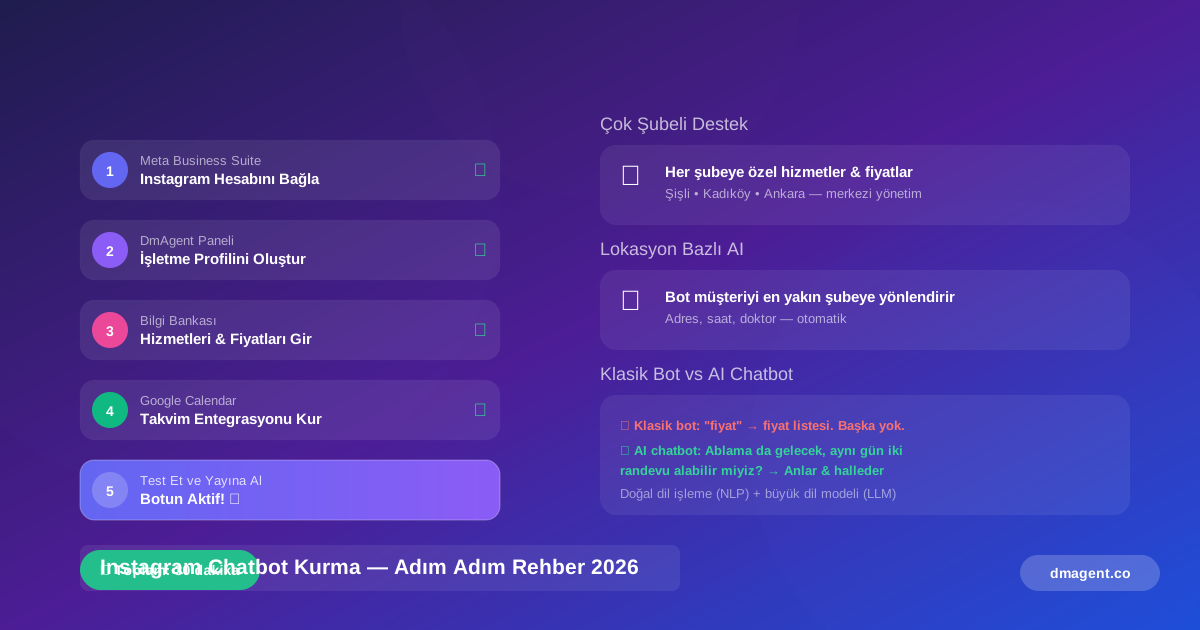
1. What Is an Instagram Chatbot?
An Instagram chatbot is an AI-powered software tool that automatically replies to messages on Instagram Direct, runs certain flows and routes customers.
Classic chatbots sent pre-written replies based on trigger words. Today's Instagram chatbots work much smarter thanks to natural language processing (NLP) and large language models (LLM): they understand the customer's real intent, grasp context, and correctly route even complex requests.
Classic Bot vs AI-Powered Chatbot
| Feature | Classic Bot | AI Chatbot |
|---|---|---|
| Response logic | Sends price list when it sees "price" | Understands the customer's real intent |
| Complex questions | Says "I didn't understand", gets stuck | Understands "Can my sister come too — same day for two appointments?" |
| Learning | Doesn't learn, stays static | Learns from every conversation, improves |
| Context | Processes each message independently | Remembers conversation history |
2. What Can an Instagram Chatbot Do?
A correctly set up Instagram chatbot automatically handles a large portion of what a full-time assistant would do:
| Feature | What It Does |
|---|---|
| Auto Greeting | Personalized welcome message within seconds for every DM |
| FAQ Answering | Price, hours, address, booking, preparation info — repetitive questions automated |
| Appointment Booking | Lists available slots, adds selected time to calendar, sends confirmation |
| Story Reply Automation | Starts automatic DM flow for people who react to your stories |
| Comment-to-DM Conversion | "Sent you a DM" reply to post comments + start DM conversation |
| Payment Link Sending | Prepayment or deposit request for appointment confirmation |
| Reminder & No-Show | Automatic reminders 48h / 24h / 2h before, confirmation system |
| Satisfaction Measurement | Post-appointment automatic survey, review request, star rating |
| CRM Update | Automatically saves every conversation to customer profile |
3. Chatbot Setup Requirements
Everything you need to set up an Instagram chatbot is probably already at hand. There are no technical barriers.
Required
- Instagram Business Account or Creator Account (personal accounts don't work)
- Facebook Page (Instagram and Facebook accounts must be linked)
- Meta Business Suite access (free, business.facebook.com)
- Account with your chosen chatbot platform
Nice to Have
- WhatsApp Business number — for dual-channel automation
- Google Calendar account — for calendar integration
- Payment infrastructure (Stripe, etc.) — for prepayment feature
4. Step-by-Step Instagram Chatbot Setup
The steps below describe the Instagram chatbot setup process via DmAgent.co.
Convert Instagram to a Business Account
Go to Instagram Settings > Account > Switch to Professional Account. Select the "Business" category. This step is free and reversible.
Connect Accounts in Meta Business Suite
Go to business.facebook.com. Combine your Facebook Page and Instagram account under the same Business Suite. This connection is required for chatbot API access.
Register with DmAgent.co
Choose your plan and register at DmAgent.co. First 14 days free, no credit card required.
Connect Instagram Account to the Platform
Click "Connect Instagram" from the DmAgent dashboard. Grant permission to your account on Meta's authorization screen. Connection completes automatically.
Fill in Business Profile
Enter your services, prices, working hours and frequently asked questions. This information forms the bot's answer database. The more detail you provide, the better the bot responds.
5. Chatbot Management for Multi-Branch Businesses
Multi-branch setups add complexity. Customers send DMs asking "Which branch?", "Is the Beşiktaş branch open?", "Can I book with Dr. Sarah?". The chatbot must handle all these questions correctly for each location.
DmAgent solves this with location-based configuration: each branch has its own hours, specialists and services defined, but all are managed from a single dashboard.
6. Building a Knowledge Base: Which Questions to Answer
The quality of your chatbot is directly proportional to the quality of your knowledge base. These are the minimum requirements:
- Service list and prices
- Working hours (weekdays and weekends)
- Address and parking information
- Specialist names and specializations
- Appointment booking process
- Cancellation and postponement policy
- Payment methods
7. Common Setup Mistakes
Mistake 1: Only Sending a "Hello" Message
- ❌ Bad: "Hello! Your message has been received, we'll get back to you soon."
- ✅ Good: "Hi there! 😊 We can book your appointment for the earliest available slot — which date works for you?"
Mistake 2: Too-Long Messages
Customers don't want to read long text in DMs. Replies should be short, clear and action-oriented. Maximum 3–4 sentences.
Mistake 3: Forgetting Human Handoff
Complex complaints or refund requests shouldn't be left to automation. The system should route these to a real person and notify relevant staff.
8. Set Up in 30 Minutes with DmAgent.co
DmAgent is an AI platform that automatically manages Instagram and WhatsApp DMs.
Create a free account
Start a 14-day trial at DmAgent.co. No credit card required. (5 min)
Connect Instagram
Connect your Instagram Business account with a single click via Meta Business Suite. (10 min)
Fill in the knowledge base
Enter services, prices, working hours and frequently asked questions. AI learns the rest. (10 min)
Test and go live
Send yourself a DM to test the system. When ready, activate with one click. (5 min)